Your Hoco earbuds,
in the Mac menu bar.
See each bud's battery, switch noise cancellation and change the EQ without reaching for your phone. A native Mac app, styled like the AirPods menu.
- Free and open source
- macOS 13 or later
- Apple Silicon and Intel
- 3.1 MB download
Private by design
No account. There's nothing to sign up for.
No internet. AirBuds talks to your earbuds directly over Bluetooth.
No telemetry. Free and open source, MIT licensed.
Features
Everything your phone app does, on your Mac
AirBuds only shows the controls your earbuds say they support. On a model without ANC, the noise control section simply doesn't appear.
Battery and time left
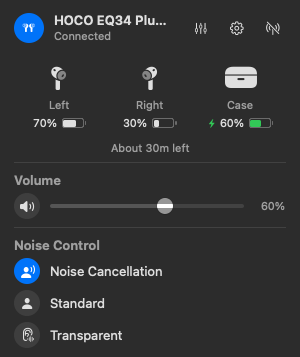
Left bud, right bud and case, an estimate of time left, and a chart of your listening session.
Noise control
Noise Cancellation, Standard or Transparent in one click, with the current mode shown in the menu bar.
EQ presets and Custom EQ
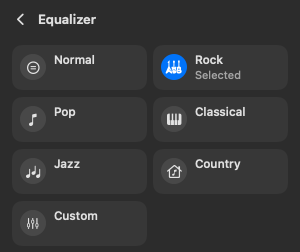
Normal, Rock, Pop, Classical, Jazz and Country, or shape 10 bands from 31 Hz to 16 kHz yourself.
Per-app automations
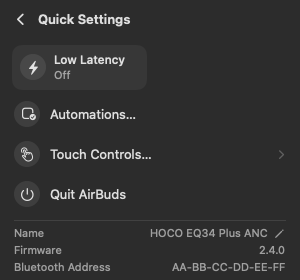
Transparent while FaceTime is open, Low Latency for a game. Switches back when the app quits.
Touch controls
Choose what single, double and triple tap do on each bud. Saved on the earbuds.
Keyboard shortcut and links
Switch the noise mode from any app, or use airbuds:// links from Shortcuts and scripts.
Battery alerts
A notification at 20% and again at 10%, and when a bud or the case is fully charged.
Volume and Low Latency
A volume slider and mute for the earbuds, and game mode for tighter audio sync in games and video.
Connect, rename, device info
Connect and disconnect without Bluetooth settings, rename your earbuds, and see the firmware version.
Screens
Feels at home on macOS
Native Swift and SwiftUI, in light and dark mode, with your system accent color.


Install
Install in a minute
-
1
Download and drag to Applications
Get AirBuds-0.3.0.dmg, open it and drag AirBuds into Applications.
-
2
Allow it to open
AirBuds isn't notarized by Apple, so macOS blocks the first launch. Open System Settings → Privacy & Security and click Open Anyway, or run:
$ xattr -dr com.apple.quarantine "/Applications/AirBuds.app" -
3
Allow Bluetooth and connect your earbuds
Click Allow when macOS asks for Bluetooth access. Pair your earbuds in System Settings as usual, then click the earbuds icon in the menu bar.
Released Nov 23, 2026 · Release notes and checksums · All versions
Supported earbuds
Hoco earbuds built on Jieli chips, which covers most of the range.
- HOCO EQ34 Plus ANC Tested
- Other Hoco models Should work
Model not connecting? Open an issue and it can be added.
Put your earbuds one click away.
Free and open source. No account, no internet, no telemetry. Installs in a minute.
Version 0.3.0 · 3.1 MB · macOS 13 or later